6×
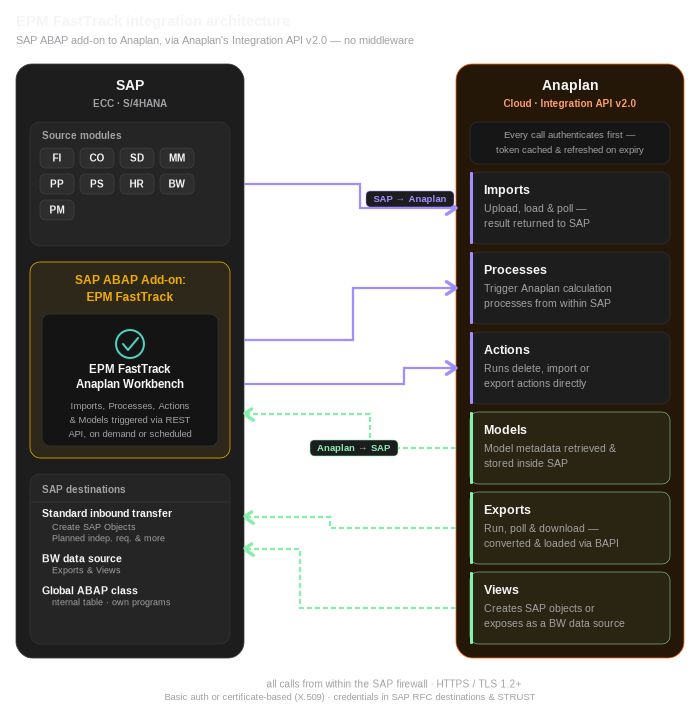
Imports, Processes, Actions, Models, Exports and Views — called from SAP.
0
ABAP add-on installed using SAINT.
Independently validated against SAP standards.
Every capability is configured and operated from within SAP using familiar tools — Anaplan objects appear in F4 drop-down lists, standard job scheduling, drag-and-drop field mapping.
Large volumes handled automatically. For high volumes, data is broken into packets, with that same chain of calls repeated for each — again as one seamless process.
Sequencing guaranteed. Processes only fire after imports complete. Jobs can also be coordinated with SAP internal processes — e.g., loading sales orders only after backorder processing has finished.
Full orchestration. Combine imports, processes and actions in a single SAP job. Everything runs in sequence, monitored from SAP, without human intervention.
Efficient by design. The full model isn’t re-fetched on every transfer. When an import, export, process or action runs, SAP checks just that individual artifact against Anaplan — e.g. confirming an export’s record count matches what SAP actually receives — keeping every transfer fast and verified.
Pull approved plan data from Anaplan back into SAP — creating standard SAP objects including Planned Independent Requirements, purchase orders and overhead plans. Exports can also feed a BW data source.
Nothing to configure in Anaplan. Because views are read live, new reporting needs don’t wait on an Anaplan modeler to build and maintain an export action. Ideal for ad hoc or frequently changing requirements.
The questions that matter most for SAP customers evaluating how to connect to Anaplan for a complete planning process.
|
EPM FastTrack. |
Middleware.
Boomi, MuleSoft, Integration Suite. |
Data platform.
Snowflake, Databricks, Fabric. |
|
|---|---|---|---|
|
Where it runs. |
Inside SAP — ABAP add-on, no external system, operated by your SAP team — and inside your firewall. |
Outside SAP — separate platform, separate team, separate support contract. Needs a route in through your firewall, usually via a special on-premise connector or agent. |
Outside SAP — cloud data warehouse requiring its own pipeline into Anaplan. |
|
Moving bulk data. |
Full data sets moved in one load — e.g., 78,000 material records loaded in seconds, with Anaplan simply updating existing records. Because the whole set is sent every time, there’s nothing to lose track of — no missed records to find and resend. |
Typically IDoc-based — designed around individual transactional records. If one IDoc fails or is missed, Anaplan silently falls out of sync until someone identifies and resends the missing record. Batch configuration exists but is complex to set up, and default volume limits mean bulk historical loads often need extra tuning most customers don’t do by default. |
Can handle bulk volumes well, but SAP data must land in the platform first before it can reach Anaplan — an extra hop that adds delay, so Anaplan is only ever as fresh as the last time the platform itself was refreshed from SAP. |
|
Write-back to SAP. |
Fully bidirectional — creates PIRs, purchase orders, overhead plans and accounting documents directly in SAP as standard objects; Exports also feed BW or your own ABAP programs. |
Import-only or limited — writing back into core SAP objects requires significant custom development. |
Not designed for this — data platforms are not built to create objects in SAP transactional systems. |
|
Time to value. |
Working with production data within days — no new infrastructure, complete software installed with SAINT. Standard sources and objects need only drag-and-drop configuration; new ones are typically added as a product extension — a lighter lift than the custom development middleware requires. |
Weeks to months — new platform to procure, configure, secure, and train a team on — and then integrations to develop. |
Months — only viable if SAP data is already in your data platform at the right granularity. |
|
Who can use it? |
Business users can see what data moves and set up transfers themselves — all within SAP. |
IT-owned platform — business sees SAP only through standard reports, Anaplan only in Anaplan. |
Business users may well have access to the data platform itself, but that’s now a third system to reconcile — SAP, data platform, and Anaplan all have to line up before a number can be trusted. |
Confirm technical fit before your first conversation with us.
SAP ECC 6.0 EHP6+
S/4 HANA 1909 – 2025
On-premise & private cloud.
Integration API v2.0
Authentication
Basic and X509 Certificate
TLS 1.2+
No extra hardware, no new servers, no cloud infrastructure to procure or maintain.
Operated using familiar SAP tools. No specialist middleware team or separate support contract.
No separate platform — a fixed monthly fee aligned to your Anaplan licence, with no hidden extras.
Independently validated against SAP standards — reduces risk for IT and security sign-off.
The same SAP-native integration across multiple business areas.
FI, CO, FI-AA, CO-PA, PS and BW — the full financial data landscape integrated into Anaplan for budgeting and forecasting.
Sales orders, customer data, pricing conditions and SD/MM sources — feeding Anaplan with the commercial data that drives revenue planning.
PP, MM and plant data — connecting SAP supply chain execution with Anaplan demand and production planning in both directions.
We’ll show you a live connection between SAP and Anaplan — actuals load, master data sync, and write-back, moving data in both directions — in a single session.
We use cookies to personalise content, provide social media features, and analyse our traffic. We also share information about your use of our site with our analytics partners. You can change your preferences at any time. For more information, please see our Privacy Policy.